DrivrSync text alerts
How crew members opt in, what messages they receive, and how to stop them.
Program: DrivrSync Crew Alerts
Sent by: L&MC Innovative Ventures Ltd Co, operator of DrivrSync
From: (877) 722-7138 (toll-free)
Message frequency: varies, typically a few messages per week
Cost: Message and data rates may apply. Reply STOP to opt out, HELP for help.
Who receives texts
Only members of one pharmacy courier driver crew who have opted in. DrivrSync is invite-only, so members of the public cannot sign up and never receive messages. There are two kinds of recipients:
- Drivers, who get alerts when a partner pharmacy updates its pickup status or requests an extra or STAT run, and about shifts that need coverage, trade requests, and schedule changes.
- The crew dispatcher, who gets an escalation alert when a shift is still uncovered close to its departure time.
No marketing or promotional messages are ever sent. Messages never contain patient information.
What triggers a text
Texts are sent automatically when something happens that the crew needs to act on:
- Pharmacy staff tap a status button on their pharmacy page (running behind, ready for pickup, or an extra or STAT pickup request).
- A driver posts a shift that needs coverage or proposes a shift trade.
- A shift is still uncovered close to departure, which alerts the dispatcher.
Pharmacy staff do not receive texts and do not choose who receives them. Alerts go only to crew members who opted in.
How drivers opt in
- The crew administrator adds the driver to DrivrSync and sends them a personal invitation to the app. The invitation is not sent from the DrivrSync text line.
- The driver signs in to the app with their own mobile number.
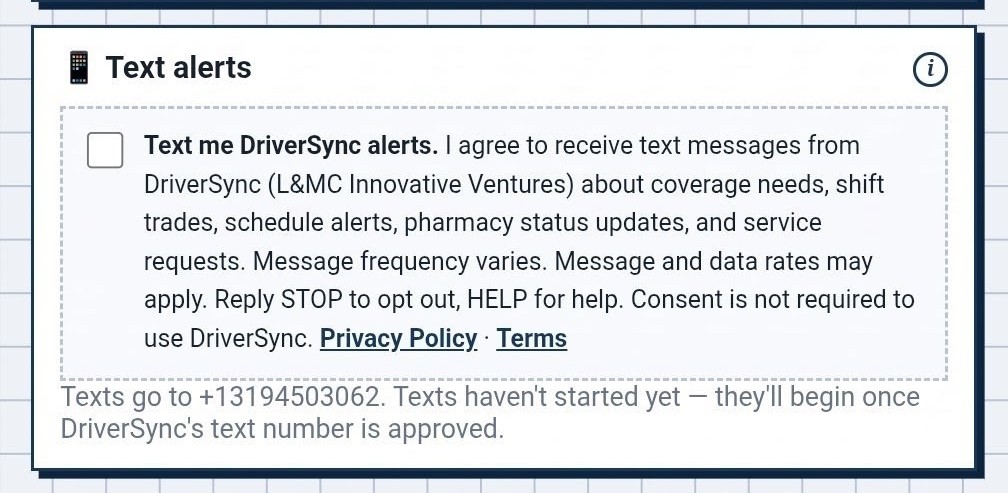
- During profile setup, the driver sees an optional checkbox for text alerts. It is unchecked by default. The driver can finish setup and use every part of the app without checking it.
- If the driver checks the box, DrivrSync records their consent with a timestamp and sends a confirmation text.
- Drivers can turn text alerts off at any time in the app's settings, or by replying STOP.
The consent language shown next to the checkbox reads:
How the dispatcher opts in
The crew dispatcher does not use the app day to day. The dispatcher opts in by texting START to (877) 722-7138. DrivrSync replies with the confirmation message below, and the dispatcher can reply STOP at any time.
Keywords and replies
| Keyword | What it does | Reply sent |
|---|---|---|
| START | Opts in, or opts back in after STOP. | DrivrSync: You're subscribed to DrivrSync crew alerts. Msg frequency varies. Msg & data rates may apply. Reply HELP for help, STOP to opt out. |
| STOP | Stops all messages. Also works with UNSUBSCRIBE, CANCEL, END, and QUIT. | DrivrSync: You're unsubscribed and will get no more texts. Reply START to resubscribe. |
| HELP | Sends contact information. | DrivrSync crew alerts. For help email admin@drivrsync.com or call (319) 450-3062. Msg frequency varies. Msg & data rates may apply. Reply STOP to opt out. |
A driver who checks the box in the app receives the same confirmation message as the START reply.
Sample messages
Privacy
Mobile numbers and text alert consent are never sold, rented, or shared with third parties or affiliates for marketing or promotional purposes. See the privacy policy and the text alert terms.
Questions
Email admin@drivrsync.com or call (319) 450-3062.